TotalMix FX Control
Stream Deck plugin for TotalMix FX — documentation
Dials and gestures
Turning
Level controls step in decibels along RME’s own fader curve, so a detent moves the same amount whether the fader sits at −40 dB or at unity. The step size is dB per step in the button’s settings (default 1.5 dB; the default for new buttons can be changed under Defaults for new buttons). Preamp gain steps in whole dB. Pan steps 1 % of the throw (two of TotalMix’s units), snapped so turning back lands exactly on centre. Effect parameters step in their own unit, see FX & Dynamics.
Keys instead of dials
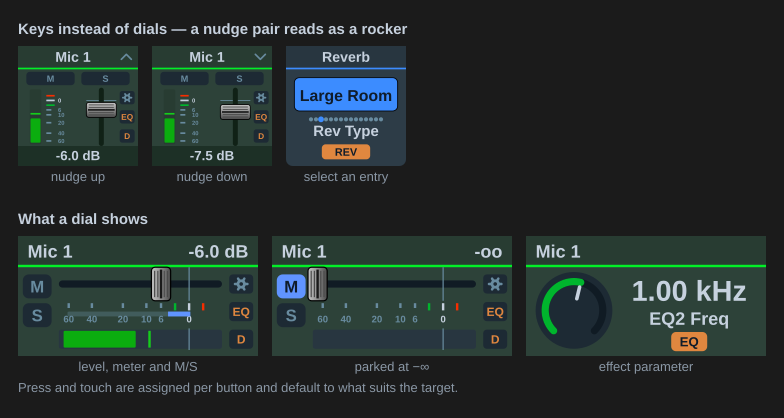
Every level or parameter action also works on a regular key. Under Key press (or On press for effects) choose Nudge up or Nudge down; each press moves by the same step a detent would. A + and a − key make a volume rocker. The key’s header shows a chevron for the direction. List parameters can also Select an entry directly, see select keys.
Across two keys draws one strip over a neighbouring pair. Set one key to Top half and the key under it to Bottom half (or Left/Right for a side-by-side pair), both on the same channel, and the fader, meter and scale run across both: the strip is laid out at twice the size and each key shows its half. Each key keeps its own press action, so a top/bottom pair is a fader and its own rocker at the same time, with the direction chevron drawn on whichever key it belongs to.
Link the halves pairs a split fader’s two keys by position, top above bottom or left beside right. A key set to a half takes the neighbour’s channel; later edits carry across. Key press, hold and set value stay per key.
Hold the key runs a second action on a long press: To 0 dB, To -oo, Hard left, Hard right, Centre, Mute, Set the value below, or Ramp up / Ramp down, which move the level while held at 1–24 dB/s (a preamp in 1 dB steps). Hold time 200–3000 ms. With a hold set, the press runs on release, and not at all once the hold has run. Off by default.
Next channel and Previous channel are both a key press mode and a dial press or touch gesture. They step the button along a list of channels set under Advanced: channel cycling, so four dials can cover sixteen channels. Name a group there and every button using that name steps together, which turns a row of dials into one channel strip. Without a group the channel is stored on the button, so it comes back where you left it. On a dial the target has to be Channel, Input gain or Pan; Main Out and the other control-room targets have no channel to step, so the gesture is not offered there.
Alt function swaps the dial to a second target (Channel level, Input gain or Pan) on the same channel; the same gesture swaps back. The alternate behaves as the dedicated button would; a gain or pan alternate is named in the knob’s caption. Not saved: a page change, an edit or a restart returns the dial to its own target.
Show the submix (3 s) (Global OSC, input and playback controls) names the submix the control feeds for 3 seconds or until the next press, and writes nothing; see Volume (TotalMix 2.1+).
On Input gain, Set to −∞ drops the preamp to 0 dB and a second press restores it. The ceiling comes from the detected interface.
Set the value below is also available as a dial press or touch gesture, so a dial can jump or fade to a level as well as a key. Fade over ramps to the value over a set time instead of jumping, for an end-of-show fade or a timed duck. It interpolates on the fader position, so the move is even from one end of the throw to the other.
Set a value writes a fixed value on every press instead of moving by a step: −20 dB on a Dim key, 0 dB on a fader, a track number on a DURec key. The field accepts only the range the parameter allows, and the plugin holds the value to it in case an older button carries something outside. Preamp gain is the one range that depends on the interface, so the field allows the widest preamp span and the plugin clamps to the interface TotalMix reports. A Set a value key draws no chevron, since nothing moves. Instead it marks where the value sits: a line across the fader track, a tick outside the knob ring, or a ring around the entry’s dot on a list key. The readout keeps showing what the parameter is now, so the marker and the cap read as target and current.
Second press decides what a Set a value press does while the target still holds the value: Nothing (the default), Back to the previous value, which returns to the level the first press replaced, or Switch to another value. With a fade set, the way back fades too, and a press during a fade decides against where the fade is heading, so pressing twice quickly turns it round. Moving the level away from the value in between makes the next press write the value again and remember the new starting point. The remembered level lives in memory only and is lost when the plugin restarts.
Dim (Global OSC; key press mode, dial press or touch, or hold) lowers a fader by the amount set under Dim by (dB), 20 dB by default, along RME’s fader curve, and the next dim press restores it. TotalMix’s own Dim acts on the control room only, with one amount for all monitors; this works on any channel fader, submix send, Main Out, Speaker B or Phones level, each with its own amount. Dim amount set to Follow TotalMix’s Dim uses the reduction set for the control room’s Dim in TotalMix instead, read at the moment the dim engages; changing it in TotalMix while a channel is dimmed does not move that channel, and the restore still returns to the level it left. Until TotalMix has reported its amount, a dim press does nothing. If the fader is moved while dimmed, the restore adds the dimmed amount back to where it now is rather than jumping to the old level; moved to −∞, it stays there. A dim that would go below the bottom of the scale lands on −∞, and the restore still returns to the original level. The dim state belongs to the level, not the button, so a key and a dial on the same channel share it. Fade over applies in both directions. A dim key draws a down chevron while it would dim and an up chevron while engaged, with the marker on the level it returns to. Like the set memory, the state is not kept across a plugin restart.
Key face (keys with Dim or Set a value as Key press or Hold the key; the key press decides when both are set) replaces the fader or knob with a button: DIM, lit while the dim is engaged, or SET, lit while the target holds the value, so the next press would run Second press. The caption under it names the channel, and the lit face is TotalMix blue, as on the Toggle action’s DIM key. With the Icon with value title appearance the key shows the DIM or SET icon in its on or off state instead, with the current level as the title.
Press and touch
A Stream Deck+ dial has three inputs: turn it, press it, tap the touch strip above it. Turning always sets the value. Press and touch are assigned per button under On press and On touch, and default to what suits the target:
| Target | Press | Touch |
|---|---|---|
| Main / Control Room, Speaker B | Mute (fader to −∞) | Dim |
| A Phones slot | Mute | Fader to −∞ |
| A channel, a strip, input gain | Mute | Fader to −∞ (gain to minimum) |
| A submix send (Global OSC) | Solo | Fader to −∞ |
| Pan | Mute (solo for a send’s pan) | Centre |
| An effect parameter | Switch the section on/off | Parameter to neutral (0 dB or the first list entry; classic: the middle of the range; Global OSC parameters without a neutral switch the section instead) |
Either can be reassigned. The menu is grouped by what the choice acts on and only offers what the target supports:
- This dial: mute, solo, cue (classic only), phantom power, set to −∞, set to 0 dB, centre the pan, bypass the effect, back to neutral, to neutral and back.
- Control room: dim, mono, talkback, speaker B, mute Main Out, external input, mute FX return, recall main volume. These are global switches, so any dial can carry one.
- Global: mute all, solo all.
- Nothing.
Mute Main Out is the one control-room gesture that is not a plain switch. TotalMix has no control-room mute of its own, so this writes the real output mute of every assigned monitor output. Dim and Recall move the Main Out fader, so a fader-based mute shares that control with them; this one does not.
Setting a fader to −∞ remembers the level it was at, so the next press or tap restores it. It silences the channel without touching its mute, which also leaves any mute group the channel belongs to alone. On the classic actions and on a Global OSC submix send (which has no mute) a fader parked at −∞ is drawn as muted.
What the display shows
With the TotalMix look a dial shows the channel name, the value, the fader position on the real scale, the meter (Global OSC, with level messages enabled) and lit M/S pills. With the icon look it shows name, value and a position bar, and the whole display washes blue for mute and orange for solo.