TotalMix FX Control
Stream Deck plugin for TotalMix FX — documentation
FX & Dynamics (TotalMix 2.1+)
Effect, EQ, dynamics, Auto Level, Room EQ, reverb and echo parameters over Global OSC, by absolute channel number. Key or Stream Deck+ dial. Each parameter steps in its own unit.

Parameters
| Group | Parameters | Bus |
|---|---|---|
| FX send and return | FX Send (inputs, playbacks), FX Return (outputs) | per channel |
| EQ | Band 1 type, gain, frequency, Q · Band 2 gain, frequency, Q · Band 3 type, gain, frequency, Q | inputs, outputs |
| Low cut | Frequency, Slope (6 / 12 / 18 / 24 dB/oct) | inputs, outputs |
| Dynamics | Make-up gain, Attack, Release, Compressor threshold and ratio, Expander threshold and ratio | inputs, outputs |
| Auto Level | Max gain, Headroom, Rise time | inputs, outputs |
| Control Room | Dim · Recall volume · External input gain | none |
| Channel | Width (inputs, playbacks) · Crossfeed (outputs; Off, 1 to 5) · Reference level (line inputs and outputs; list depends on the interface, see Devices) · DURec track | as listed |
| Room EQ | Volume correction, Delay, and gain/frequency/Q of all nine bands (type on bands 1, 8, 9); left and right separately | outputs |
| Reverb | Type, Volume, Pre-delay, Low cut, High cut, Room scale, Smoothness, Width; Time and High damp (Space type); Attack, Hold, Release (Envelope types) | none |
| Echo | Type, Volume, Delay, Feedback, High cut, Width | none |
Where a parameter exists on one bus only, the bus picker is hidden and that bus is written. Where it exists on two, the third is not offered. Reference level applies to line inputs and outputs; mic and instrument inputs have no level switch, and TotalMix ignores a write to a channel that lacks one.
Steps
The step per detent or press is set in the parameter’s own unit, one slider per unit type:
| Unit | Setting | Default |
|---|---|---|
| dB (gains, thresholds, levels) | dB per step | 1 dB |
| Hz (frequencies) | Hz per step | 20 Hz |
| List entries (types, slopes, crossfeed, reference level) | none; one entry per step | 1 |
| Fine values (width, room scale) | Units per step | 0.05 |
| Tenths (Q, ratios, rise time) | Units per step | 0.1 |
| Whole numbers (ms, %) | Units per step | 1 |
| Coarse (release) | Units per step | 10 |
Frequencies are clamped to 20 Hz and 20 kHz, list parameters stop at the ends of their list, and everything else is clamped by TotalMix.
Press and touch
By default a press switches the parameter’s section on or off (EQ, low cut, dynamics, Auto Level, Room EQ, reverb, echo; FX send and return switch the reverb), and touch parks the value at its neutral and brings it back. Neutral is 0 dB for dB parameters (the expander threshold and Auto Level headroom, whose ranges exclude 0 dB, go to the bottom of theirs), the first entry of a list, and for Room EQ the values its panel opens on; frequencies and unitless values have none, so their touch defaults to the section switch. Both are reassignable, see Dials and gestures.
Parameters with no section (width, crossfeed, delay, reference level, DURec track) have no enable to switch: a press parks them at neutral and a second press restores, where a neutral exists; width and delay have none and the press does nothing unless another gesture is assigned.
On the key or display
A knob with the arc in the section’s colour: EQ band 1 red, band 2 green, band 3 blue, compressor red, expander green, low cut orange, everything else blue. Centre-zero parameters (gains, width) fill from the middle. Value beside the knob, parameter name underneath, and a badge (EQ, LC, D, AL, FX, REQ, REV, ECHO) that lights orange while the section is on. Where TotalMix publishes no range for a parameter the arc uses a display range measured with the probe scripts; it affects the arc only, never the value written.
List parameters draw as a dropdown box with the entry name and position dots.
Select keys
For a list parameter, a key can write one specific entry instead of stepping. Set On press to Select an entry and two settings appear.
Entry is what a press writes. The list comes from the plugin, and for reference level from the reported interface, per bus.
Second press is what a press does while the key is lit, meaning its entry is the active one: Nothing, Back to the previous entry, or Switch to … another entry.
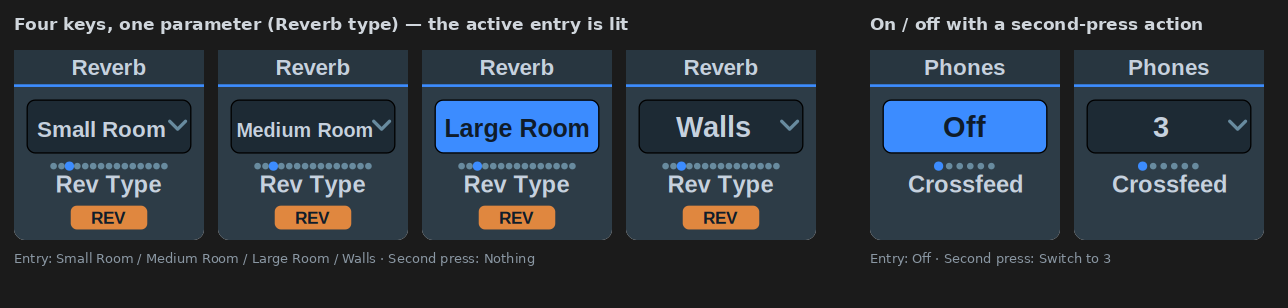
The key shows its entry and lights while that entry is active. Related key modes:
- Four keys with four reverb types, second press Nothing: a preset row.
- Crossfeed “Off” with Switch to 3: an on/off key. On a dial, a press parks crossfeed at “Off” and a second press restores.
- “Large Room” with Back to the previous entry: a momentary override.
- Set a value can alternate: Second press decides what a press does while the parameter already holds the value, going back to the previous value or on to a second one.
- List parameters move one entry per detent or press; there is no step setting. Their key press mode is Select an entry. Set a value is offered instead on the DURec track, whose entries are numbers.
- DURec track: 0 is “Off”, above that the track number; a stereo channel takes consecutive tracks. The count comes from the recording, so the list has no fixed end and TotalMix refuses positions past the last track.
- The three Control Room levels (dim attenuation, the level Recall restores, the external input gain) are in dB over −65 to 0 and take no channel setting.
Make-up gain
- Comp Thresh and Comp Ratio can write the make-up gain with them: Make-up gain: follow writes
gain = (reference − threshold) × (1 − 1/ratio)on every change, by dial or key. Restore in full uses 0 dBFS as the reference; by half writes half of that; from a reference uses the level entered; match the channel’s own peak uses the reported peak level and needs Send Level Messages; a value I set writes a fixed figure. Trim is added in dB. - A Set a value key on Makeup Gain can compute the value with the same rules (full, half, reference) from the threshold and ratio at the time of the press. Without a reported threshold or ratio it writes nothing.
- The expander is not part of the computation. The rules are the plugin’s arithmetic; TotalMix has no auto make-up.
- A second press on a key whose make-up is following restores the make-up gain that was held before, together with the parameter.
“Previous” is remembered per parameter, so it works across keys. With nothing remembered, on the first press after startup, the key stays put.
Notes
- Reference level, crossfeed and the other channel parameters are on the FX & Dynamics action because they step like effect parameters, not because they are effects.
- Send and return levels and the reverb/echo volumes follow the fader curve. “-oo” means the level sits below the bottom of the scale.